Explainer · Feeds & Standards
What GTFS is, and how a transit feed fits together
GTFS is the open format that puts transit schedules into your maps app. Here is what a feed contains, how its files join together, and why it became the default for transit data worldwide.
GTFS, the General Transit Feed Specification, is the open format transit agencies use to publish their schedules so that any app can read them. A feed is a single zip file of plain-text tables that spell out one agency’s routes, stops, and timetables, laid out the same way whether it comes from a two-bus rural service or a big-city subway. When a maps app shows you the next departure or plans a trip that crosses two operators, it is almost certainly reading GTFS underneath. That sameness is the whole point. One format, read the same way everywhere, is what lets a rider in a city they have never visited get transit directions as easily as driving directions.
There are two halves to it. GTFS Schedule, the static part that people usually mean when they just say GTFS, describes the planned service: what runs, where it stops, and at what time. GTFS-Realtime sits on top and carries the live picture: delays, vehicle positions, and service alerts. This piece is mostly about the schedule half, because it is the foundation the realtime half is defined against.
Where GTFS came from
GTFS is younger than most people assume, and its origin is unusually specific. It started as a collaboration between Portland’s TriMet and Google. Bibiana McHugh, an IT manager at the Oregon agency, wanted transit directions to work the way driving directions already did, and took the idea to Google. The two sides agreed on a simple, spreadsheet-friendly way to package a schedule, and Google Transit launched in Portland in December 2005. By September 2006 five more cities had published their service in the same format: Tampa, Honolulu, Eugene, Pittsburgh, and Seattle.
The format was called the Google Transit Feed Specification at first. In 2010 the name changed to the General Transit Feed Specification, dropping the vendor from the title once it was clear that plenty of software besides Google Maps had come to depend on it. GTFS-Realtime followed in 2011, and in 2019 the standard moved to a neutral steward, the nonprofit MobilityData, which now shepherds changes and maintains the documentation. The reach of the format today is easy to underestimate. The Mobility Database, the open catalog MobilityData runs, lists more than 6,000 feeds from over 99 countries, and even that counts only the feeds the catalog knows about.
What is inside a feed
A GTFS feed is deliberately low-tech. Unzip one and you get a handful of comma-separated
text files, each with a .txt extension, that open cleanly in any spreadsheet program. The
choice of plain CSV was made so a small agency could produce and edit a feed without
specialized tools, and it has aged well. A rail operator’s feed and a single-route shuttle’s
feed use exactly the same file names and columns.
The GTFS Schedule Reference defines each file and every field in it. A feed does not need all of them. Four files are always required, a few more are required in common situations, and the rest are optional layers a publisher adds when the service calls for them.
| File | Presence | What it holds |
|---|---|---|
agency.txt |
Required | The transit agency or agencies whose service the feed describes. |
routes.txt |
Required | Routes: a group of trips shown to riders as one named service, such as the 14 bus or the Red Line. |
trips.txt |
Required | Trips: a single run along a route at a given time, tied to a service pattern. |
stop_times.txt |
Required | The arrival and departure time at every stop on every trip. Usually the largest file in the feed. |
stops.txt |
Conditionally Required | The stops, stations, and entrances where riders board and alight, each with coordinates. |
calendar.txt |
Conditionally Required | Which days a service runs, as a weekly pattern with a start and end date. |
calendar_dates.txt |
Conditionally Required | Exceptions to that pattern, such as a holiday when service is dropped or added. |
feed_info.txt |
Conditionally Required | Dataset metadata: who published it, its version, and the dates it is valid for. |
shapes.txt |
Optional | The physical path a vehicle follows, so an app can draw the route as a line on the map. |
frequencies.txt |
Optional | Headway-based service, where a line runs every so many minutes instead of on a fixed clock. |
transfers.txt |
Optional | Rules for how riders connect between routes at shared stops. |
fare_attributes.txt |
Optional | Fare prices and how they apply. |
“Conditionally required” is the part that trips people up. A feed has to define its service
days in at least one of calendar.txt or calendar_dates.txt, so neither is required on
its own but one of them always is. And stops.txt is only conditionally required because
newer on-demand extensions let a feed point at service zones instead of fixed stops. Every
conventional fixed-route feed still includes it. The reference lists more optional files than
the table above, covering station pathways, a richer fares model, and flexible on-demand
service, but the twelve here carry the substance of an ordinary schedule.
How the files fit together
The files are not a flat pile. They are relational tables wired together by shared id columns, and reading a feed means following those keys from one file to the next. This is the single most useful thing to understand about GTFS, because almost every question you can ask of a feed is a join across these tables.
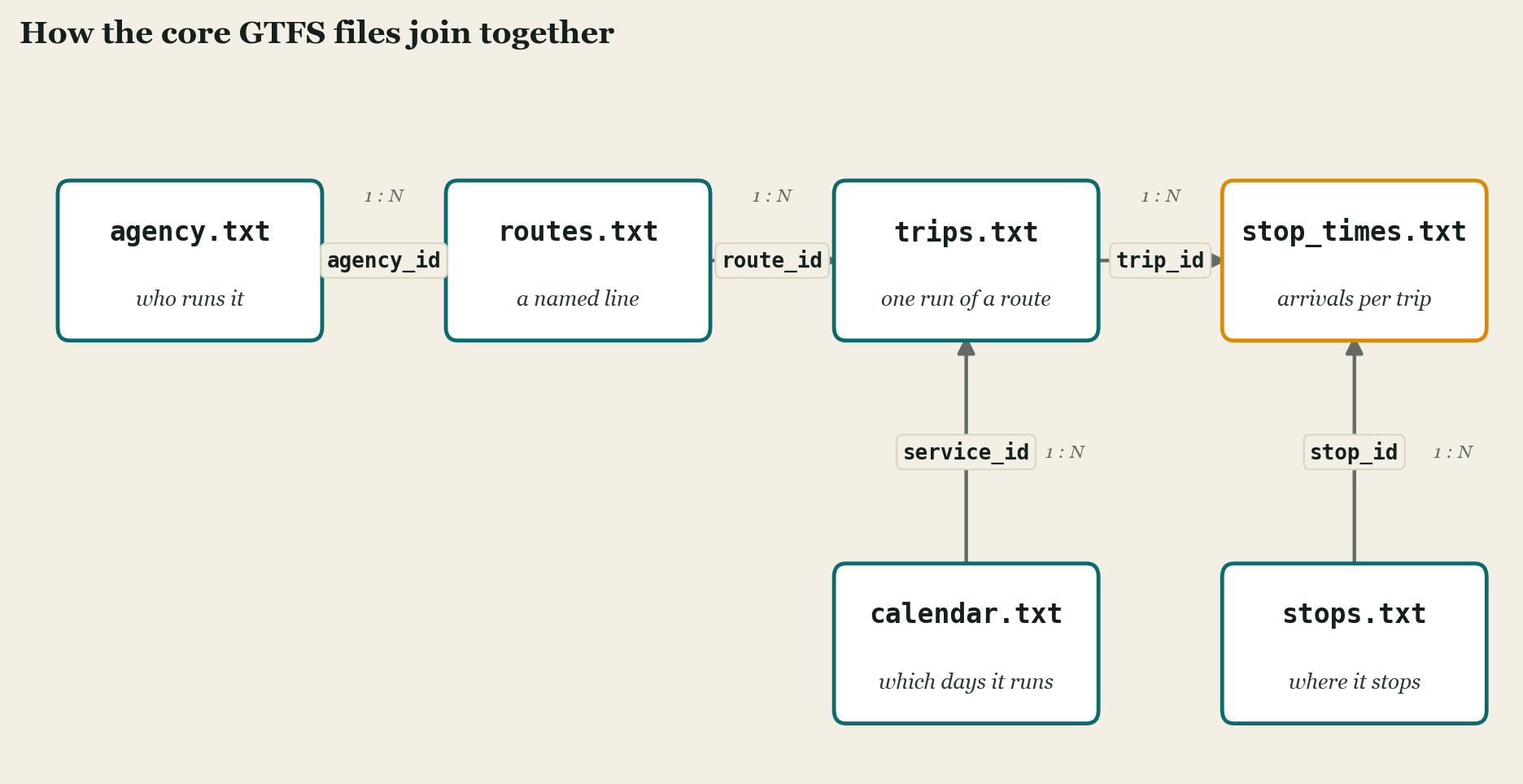
Start at the top. An agency owns routes, so each row in routes.txt carries an agency_id
pointing back to agency.txt. A route is run many times a day, so each row in trips.txt
carries a route_id. A trip is a sequence of timed stops, so stop_times.txt holds many
rows per trip, each tagged with a trip_id. That chain, agency to route to trip to stop
time, is the backbone of every feed.
Two more links do the heavy lifting. Each stop time also carries a stop_id that resolves to
a row in stops.txt, which is where the actual latitude and longitude live. And each trip
carries a service_id that resolves to calendar.txt, which says whether the trip runs on
weekdays, weekends, or some other pattern. So stop_times.txt is the table where everything
converges: it is the only place a specific trip, a specific stop, and a specific clock time
come together, which is why it is usually the biggest file and the one that governs feed
quality. Get the stop times wrong and every downstream prediction is wrong with them.
The schedule and the realtime feed
The schedule half describes a plan. Real service drifts from the plan, and that gap is what
GTFS-Realtime exists to close. A
realtime feed is always defined in relation to an existing GTFS Schedule feed, referencing
the same trip_id and stop_id values, so the two only make sense together. Where the
schedule is CSV meant for humans to edit, GTFS-Realtime is encoded with Protocol Buffers, a
compact binary format built for machines fetching frequent updates.
It carries three kinds of message. Trip updates report how far ahead or behind a vehicle is running, which is what turns a printed timetable into a live countdown. Vehicle positions report where a vehicle actually is. Alerts carry the plain-language disruptions, a closed station or a detour, that no schedule can anticipate. A full treatment of GTFS-Realtime is its own subject. The point to hold onto here is that it borrows the schedule’s identifiers rather than replacing them, so a solid static feed is the precondition for a useful realtime one.
What decides whether a feed is any good
GTFS is an open standard, maintained in the open on GitHub, where changes are proposed and debated by the agencies, vendors, and app makers who depend on it before they are adopted. That community process is why the format has stayed coherent while growing to cover fares, station interiors, and flexible on-demand service that its 2005 authors never imagined. It is also why a feed from an agency you have never heard of will still parse.
The specification only tells you a feed is well-formed, though, not that it is correct. A feed can validate cleanly and still list a stop in the wrong place, keep a discontinued route, or run months past its expiration date. The hard part of working with GTFS is rarely the format. It is the ordinary discipline of keeping the feed current: stop coordinates that match the real world, and a service calendar that gets updated the moment the schedule does. A maps app cannot tell a stale feed from a fresh one, so a neglected feed rots quietly, in plain sight. That is the lesson underneath the whole standard. GTFS made transit data legible everywhere, and left the harder problem, keeping it true, to the people who publish it.
Common questions
- What is GTFS?
- GTFS, the General Transit Feed Specification, is the open format transit agencies use to publish their schedules so that any app can read them. A feed is a single zip file of plain-text tables that describe one agency's routes, stops, and timetables, laid out the same way whether it comes from a rural service or a big-city subway.
- What is inside a GTFS feed?
- A set of plain-text CSV tables packaged as one zip file. The tables reference one another through shared IDs, so a route ties to its trips and a trip ties to the exact times it serves each stop.
- What is the difference between GTFS and GTFS-Realtime?
- GTFS Schedule is the static, planned service: what runs, where it stops, and when. GTFS-Realtime sits on top and carries the live picture of delays, vehicle positions, and service alerts. The schedule is the foundation the realtime feed is defined against.