Explainer · Agency IT
What a real-time passenger information system is, and where its data comes from
A passenger information system is the signs, screens, onboard displays, and announcements that tell riders what the service is doing. Here is what it is made of, the three ways its data arrives, what the public feeds actually give a sign, and what to specify.
A passenger information system is everything an agency uses to tell riders what the service is doing: countdown signs at stops and on platforms, screens in stations, the next-stop display and the automated voice on board, the public address system, and the agency’s app and website. The real-time part shows two kinds of message, predictions of when the next vehicle arrives and alerts about what is disrupted.
Very little of what those systems show is typed by a person for that sign. The software behind the MBTA’s subway countdown signs lays out a full line of an alert message in 24 characters. When a station is closed, the sign reads the alert’s effect code and the stations it affects, then writes its own message from phrases built into the code: “No Red Line” on top, “Use shuttle bus” underneath. The agency’s alert text would not fit. Across the US transit alert feeds we read on October 30, 2026, the median alert headline ran to 74 characters.
That makes a sign or a speaker only as good as the data behind it, and the data depends on how the equipment was bought. It reaches a sign by one of three paths.
What the system is made of
At the stop and in the station, a passenger information system means countdown signs on platforms and at shelters, larger screens at transfer points, and the public address system. On board, it means the next-stop display, the exterior destination sign, and the automated voice that calls out stops. Apps, trip planners, and the agency’s website are passenger information too. Vendors sell the hardware under names like passenger information display system, and rail suppliers often shorten it to PIS.
The real-time content comes from systems ITS Feed has covered separately. The countdown number is the output of a prediction engine, explained in how real-time arrival predictions work. The position and schedule data behind it comes from the CAD/AVL system, covered in what a CAD/AVL system does. The passenger information system is the last step, where the prediction and the alert get shown or said.
The spoken side is required. Federal accessibility rules tell fixed-route operators to announce stops at least at transfer points, major intersections, destination points, and intervals along a route sufficient for riders with visual impairments to stay oriented. Automated announcements let an agency do that on every trip without relying on the operator’s voice.
Three ways the data reaches a sign
The first path runs through the CAD/AVL vendor. On a bus, the onboard unit that reports the vehicle’s location is usually wired to the destination sign and the announcement speakers as well. The National Center for Rural Road Safety’s rural ITS toolkit describes automated stop announcements as systems that use the vehicle’s odometer or AVL position to decide when to show and play the next stop, on an interior sign and over the speakers, so what the rider sees and hears comes from data kept in the vendor’s system. Wayside signs can be bought the same way. Topeka Metro’s bus technology RFP, TM-24-01, included real-time signs that would take a data feed from the CAD/AVL solution for arrivals and service outage alerts, before an addendum in November 2023 dropped that optional section from the bid.
The second path is the agency’s own software reading an internal API. The MBTA runs its
platform signs on open-source code, so this path can be read line by line. Its
realtime_signs application drives the LED countdown signs and the in-station announcements.
It reads predictions from an enhanced version of the agency’s trip update feed, and pulls
alerts from the MBTA’s own API, filtered to the routes each sign serves. The alert effects it
acts on, SHUTTLE, SUSPENSION, and STATION_CLOSURE, are the MBTA’s own codes. The public
format’s effect codes have no shuttle or station closure among them, so the internal API gives
the MBTA’s signs more to work with than the public feed gives anyone else. The same code keeps
two names for each station, one cut to fit the sign and one written for the voice:
“B’consfield” and “Beaconsfield”, “Back o’Hill” and “Back of the Hill”.
The third path is the public feed. GTFS-Realtime, the open format behind most US transit apps, carries predictions in a trip updates feed and alerts in a service alerts feed (the GTFS-Realtime explainer covers both). Any sign that can read it can show the same data the apps show. Santa Cruz METRO’s pilot e-ink displays at its River Front Transit Center take their information from METRO’s GTFS-Realtime feed, and each has a text-to-speech button that reads the arrival and service information aloud.
The paths trade control against reach. A vendor-integrated system keeps the sign and announcement data in the same system that tracks the bus, in the vendor’s format. An internal API gives the agency the richest data, and needs the agency to build and run software. The public feed lets any sign vendor, campus, or business put arrivals on a screen, and that sign gets exactly what the feed carries.
What the public feed gives a sign
For the third path, the question is what the feed carries, so we read the 87 publicly available US service alert feeds listed in MobilityData’s Mobility Database at about 10:00 UTC on Friday, October 30, 2026. That is 6 a.m. on the East Coast and 3 a.m. on the West Coast. Of the 87, 76 returned a usable feed. The failures include a trap for any sign controller: Riverside Transit Agency and Springfield Mass Transit District answered with an HTTP 200, the code for success, and a one-line body reading “ERROR: no connectivity to BusTime server!” A sign that checks only the status code sees a working feed.
Of the 76, 32 held no alerts at that hour, including about half of the western feeds, where it was the middle of the night. The other 44 held 1,616 alerts. The figure counts how many of them used each field.
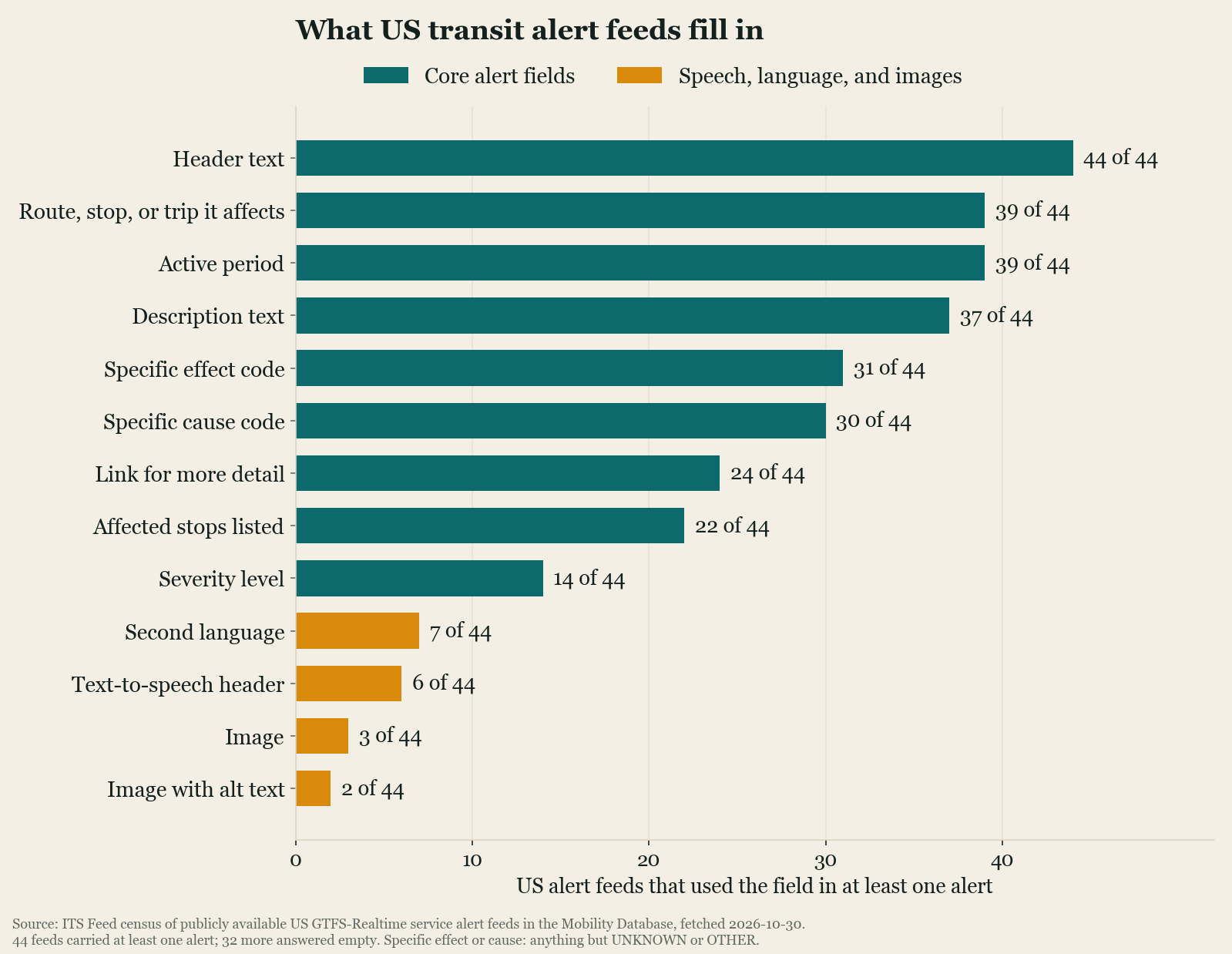
What a sign on the public feed can do with an alert depends on two fields. The effect code says what kind of disruption it is, and the informed entities say which routes, stops, or trips it touches. Together they let a sign decide on its own whether an alert belongs on its screen and what short message to show, the way the MBTA’s signs do. In 29 of the 44 feeds, alerts carry both a specific effect (anything other than “unknown” or “other”) and at least one route, stop, or trip. Only 22 feeds name individual stops, and severity, which a sign could use to decide what to show first, appears in 14. The counts barely moved when we required a field in most of a feed’s alerts rather than just one: 29 feeds for the effect code, 19 for stops, 14 for severity.
The spoken fields are thinner still. The format defines tts_header_text and
tts_description_text, a version of the alert written to be read aloud, “abbreviations
removed, numbers spelled out,” in the words of the GTFS-Realtime
reference. They are filled
in six feeds, four of them served from the same back-office URL path, and in all 114 of their
alerts the spoken headline is a character-for-character copy of the printed one, abbreviations
included: Duluth’s reads “W Superior St Detour on 1st st., temp stops on W 1st st”. Santa
Cruz METRO’s own feed, the one its talking pilot signs read, carries no spoken text at all, so
whatever those signs say about an alert has to come from the printed text.
Stop names have a spoken field too, tts_stop_name in the schedule’s stops file. We read the
stops file of every publicly available US schedule feed in the catalog, 791 feeds with 560,581
stops. The column is filled in 48 of them, covering under 5 percent of the stops, and in nearly
all of those the spoken name is rewritten for the ear: Fairfield and Suisun Transit writes “Sue Soon
Valley Road” for Suisun Valley Rd, and King County Metro spells out “NE” as “Northeast”. A
sign or an app reading the public feed has no other field that says how a stop name is
pronounced.
What to specify
The first decision is the path, because it decides whose data quality the signs inherit. A sign on the CAD/AVL vendor’s feed is as good as that vendor’s stop tables and announcement scripts. A sign on the public feed is as good as the public feed, which is also what Google Maps and the Transit app read, so improving one improves the other.
For signs on any feed, ask that the controller validate the content it receives and show a known fallback message when that content is not a valid feed, whatever the HTTP status says. The BusTime error above is the case it has to handle.
For alerts, the sign can only be as specific as the alert, so the useful requirement goes on the alerting tool: staff should set the effect and pick the affected routes and stops in the same step as writing the text, so every alert leaves the building with the two fields a sign needs. If the agency wants signs to show severity first, the tool has to record it.
Speech needs an owner: decide who keeps the spoken name of each stop and where it lives. On a
vendor-integrated bus it lives in the vendor’s announcement table; for anything reading the
public feed it has to be in tts_stop_name. Keeping one list and publishing it to both avoids
two versions drifting apart, which is the job the MBTA’s code does by hand for its stations.
Topeka’s draft spec is a reasonable checklist for the management side. It asked for posting emergency and safety alerts to one, several, or all signs, assigning routes to signs, configuring update rates and message sequencing, declaring a sign out of service with a message on it, monitoring the health of each sign, and tracking changes to messages sent.
The census figures are a snapshot of one Friday morning in October 2026. The scripts and raw results are kept so it can be run again.
Common questions
- What is a passenger information system?
- The equipment and software that put service information in front of riders: countdown signs on platforms and at shelters, screens in stations, next-stop displays and automated announcements on board, the public address system, and the agency's apps and website. Real-time passenger information is the live part of it, arrival predictions and service alerts that update as the service runs.
- Where does a real-time sign get its data?
- By one of three paths. Equipment bought with the CAD/AVL system reads the vendor's own data; onboard announcements are triggered by the vehicle's location against a stop table. Some large agencies build their own and read an internal API, as the MBTA's platform signs do. And any sign can read the agency's public GTFS-Realtime feed, as Santa Cruz METRO's pilot e-ink displays do.
- Can a GTFS-Realtime alert drive an audio announcement?
- The format has fields for it. tts_header_text and tts_description_text hold a version of the alert written to be read aloud, with abbreviations expanded and numbers spelled out. In our October 2026 census, 6 of 44 US alert feeds carrying alerts filled them, and in all 114 alerts the spoken header was identical to the printed one.
- What should an agency specify when buying real-time signs?
- Which data path the signs use, and therefore whose data quality they inherit; that the sign controller validates the feed's content rather than trusting the HTTP status; that the alerting tool records an alert's effect and the routes or stops it affects when the alert is written; and who maintains the spoken versions of stop names. Sign management functions, such as posting a message to one or many signs and marking a sign out of service, belong in the spec too.